The order cut-off date is one of the quietest decisions you make when setting up a shoot, and one of the most consequential. It is the deadline that turns "I'll get to it later" into "I need to do this today", and where you place it on the calendar has a real effect on how many parents actually place an order.
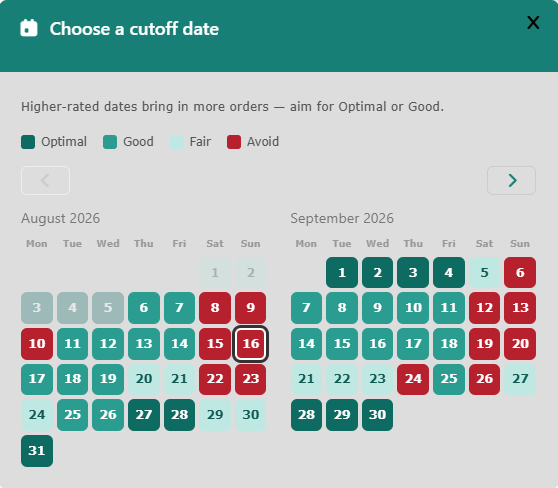
Until now, choosing that date meant typing it into a plain date field and hoping for the best. We have replaced it with something a bit smarter: a colour-coded calendar that tells you, at a glance, which days tend to bring in more orders.
What the colours mean
Open the picker and you get two months at a time, with every day shaded Optimal, Good, Fair or Avoid. Dark teal days are the ones we would choose; red days are the ones we would move. Pick a day and the field keeps its colour, so you can see what you chose without opening the calendar again.
You are never locked in. If a school has already committed to a date, or the shoot schedule leaves you no choice, go ahead and pick a red day — the picker offers guidance, not rules. It simply makes sure that when you do have a choice, you are making an informed one.
Where the ratings come from
The colours are not guesswork. They come out of the order history on the platform itself — real orders, placed by real customers, against real cut-off dates — and the calendar reflects what that history tells us about when people are most likely to buy. We will keep the ratings current as more orders come through.
Where to find it
The picker appears wherever you set order cut-off dates for a school shoot — both when you create the shoot and when you edit its details afterwards. It covers your first cut-off date and, if you run one, your second. A second cut-off is always constrained to fall after the first, so that particular bit of admin now sorts itself out.
If your own experience contradicts what the calendar is telling you, we would genuinely like to hear about it — get in touch and let us know.